Better Inspections.
Stronger Evidence. More Certainty.
Inspected is highly customisable inspection software that helps your team capture the right evidence, create consistent reports and keep a reliable record of what happened.
We configure the inspection structure, templates and reports around the way your organisation already works.
Built with 20+ Years of Front-Line Inspection Experience
One Platform. Built Around the Way You Inspect.
Every industry has different standards, risks and evidence requirements.
Inspected is configured around your organisation’s existing process, including what your team needs to check, what evidence must be captured and what the completed report needs to show.
Choose an industry to see how Inspected can work for your team.
Use case
Property Management and Estates
Complete entry, exit and routine inspections using workflows configured around your portfolio, estate or community.
Capture photographs, comments, condition ratings and signatures against the correct property, room, common area or item. Generate consistent reports and keep the inspection history when staff, tenants or contractors change.
- Entry inspections
- exit inspections
- routine inspections
- common-area checks
- contractor inspections and maintenance reporting
Don’t see your industry? If you run repeatable inspections, we configure Inspected around your process.
Talk to Us About Your WorkflowInspections Should Create Certainty. Too Often, They Create More Work.
Your team spends hours inspecting, taking photos, writing notes, and building reports because missing one important detail could cause problems months later.
- But when photos live on phones, notes sit somewhere else, and reports are finished from memory, it becomes easy to miss something.
- Then a client questions what was found. Someone disputes responsibility. Your team scrambles for proof.
- The whole point of an inspection is to know what happened when it matters.
Spend Less Time on Inspections.
Know You've Got the Evidence Right.
One missed photo can come back months later. Inspected keeps photos, comments, conditions and signatures on the inspection so the record is already there.
- When a question comes up later, your team finds the record instead of searching phones, folders and memory.
Save the time now. Have the certainty later.
How an inspection becomes a record
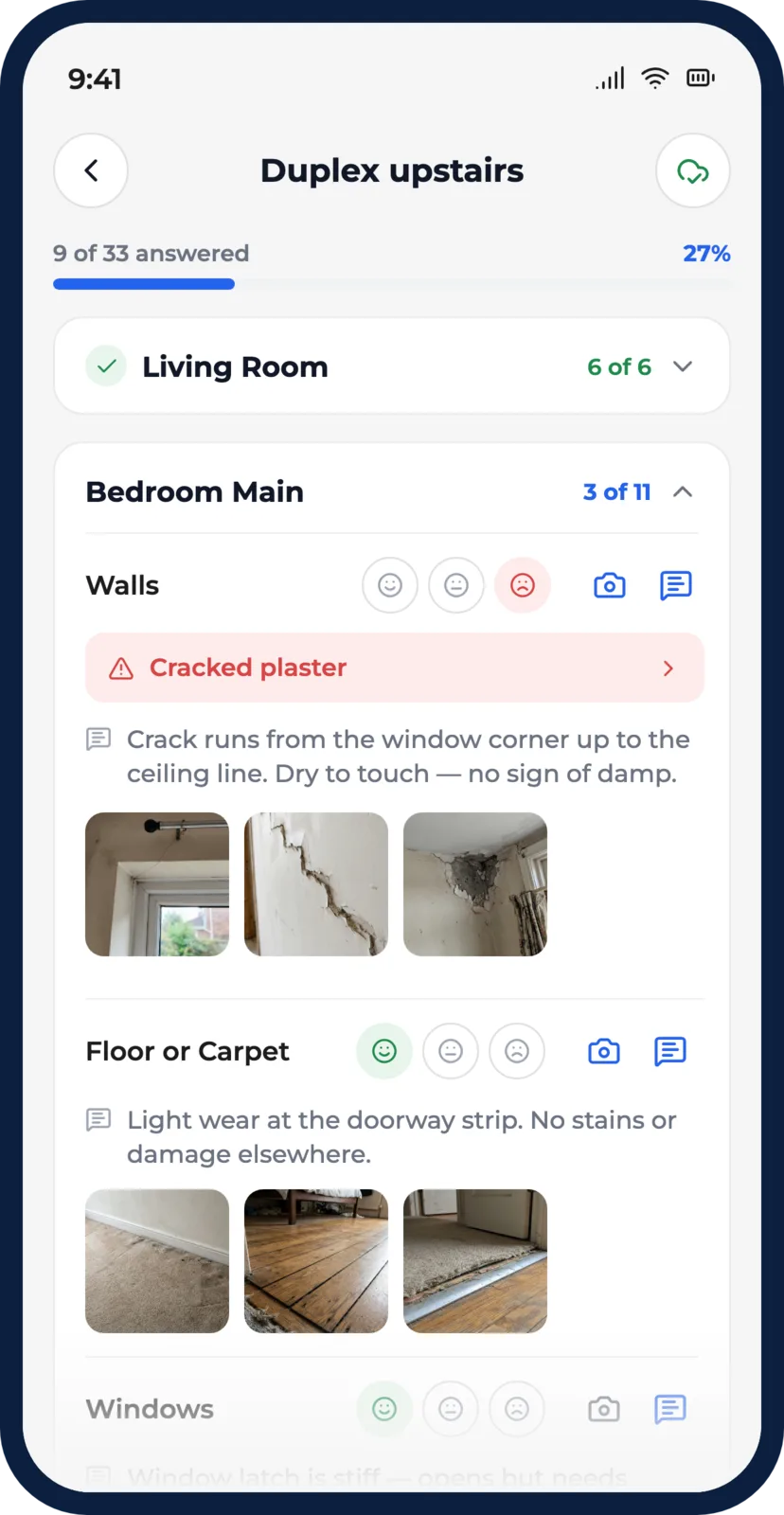
The phone below is the real app, not a video. Work through the five steps and watch a walkthrough turn into a branded PDF.
Rate an item
Mark the condition of anything on the asset as you check it.
Tap a face on any row.
Add photo evidence
Photos stay on the item you checked, not in a Drive folder.
Leave a note
Type what you saw so the record explains itself later.
Preview the report
See answered items, flagged issues and photo counts before you submit.
Email the PDF
Submit and send a branded PDF to the contacts you choose.
Sample inspection on a demo asset. Your real templates cover everything you inspect, and nothing you tap here is saved.
Why teams choose Inspected
Not another generic checklist app. Built around real inspection workflows, evidence on each item, and a PDF record you can find later.
Know What Happened and Who Is Responsible
Compare before and after condition side by side. Disputes get a clear answer.
Save Hours on Every Report
Photos and notes flow straight into the report. Nothing to rebuild afterward.
Never Lose Another Inspection
Every inspection stays with the asset, even after staff leave or devices change.
How It Works
- 1 Step 1
Show Us How You Work
Walk us through your current inspection process so we can understand what needs to stay, what needs to change, and where your team is losing time.
- 2 Step 2
We Set Everything Up for You
We handle the templates, workflow design, branding, asset setup, and configuration so you can move to a better inspection process without turning it into another project for your team.
- 3 Step 3
Start Inspecting With More Certainty
Your team captures the right evidence as they inspect so you can finish reports sooner, miss fewer important details, and have a clear record ready when something is questioned later.
Teams Are Already Seeing the Difference
Saved So Much Time
“We have been using the app for around three months now and it has saved us so much time.”
Built for Real-World Inspections
“Fundamentally the system has a lot of positives to report back on, including time stamps and offline capability. It's safe to say you are already on the right track.”
Adds Value Every Day
“Inspected is a cloud-based, offline-capable, easy-to-share solution that adds measurable value to our day-to-day operations.”
Configured for Your Workflow. Built for Reliable Evidence.
Offline Inspection Capture
Keep working when Wi-Fi or mobile signal drops so poor connectivity does not stop the inspection.
Complete Asset History
Keep previous inspections attached to the asset so you can see what changed and find evidence when questions come up.
Documents Kept With the Asset
Store important supporting documents alongside the asset record so certificates, access information, and other files are not lost across inboxes, drives, or staff devices.
Customised Inspection Templates
Start with our templates or have us design them around your process so your team captures the information you actually need.
Digital Signatures and Timestamps
Capture acknowledgements and timing alongside the inspection so your records provide a clearer account of what happened and when.
Issue and Resolution Tracking — Coming Soon
Turn defects found during inspections into trackable actions so important problems do not disappear inside a finished report.
Maintenance Flow — Coming Soon
Move issues found during inspections into a clear maintenance workflow for assignment, follow-up, and resolution, so problems can keep moving after the inspection is complete.
Done-for-You Setup
We handle your asset import, templates, branding, workflow configuration, and launch setup so your team does not have to build the system themselves.
See Inspected in your workflow
Tell us what you inspect. We’ll show you the same structured process — photos, conditions, and a report you can find later.
What we’ll cover
- How your team captures evidence on site
- How the report is built as you inspect
- How it fits the way you already work
Four fields. We’ll reply within one working day.
Frequently Asked Questions
Everything you need to know about setting up and working with Inspected.